
Roster Modes Explained
Welcome to our guide on roster display options! In this article, we will explore the different modes available for viewing rosters, helping you understand how to navigate and utilize these features effectively.
Purpose
This guide explains the roster display options available in our system. Each mode is designed to meet different user needs, ensuring you have the right tools at your fingertips.
Available Modes
There are several modes available for viewing rosters, each with its own unique features:
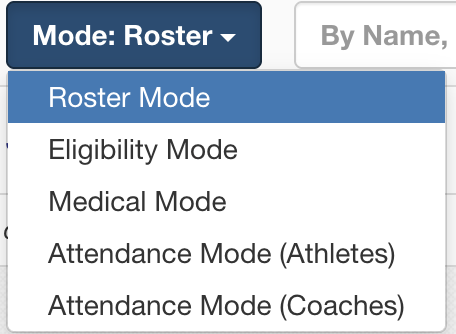
Eligibility (default for coaches): This mode allows coaches to view player eligibility information, enabling them to make informed decisions about team selections.
Roster (default for administrators): Admins can use this mode to see the complete roster, including all players and their details, making it easier to manage team compositions.
Medical: This mode provides access to medical information for players, which is crucial for ensuring their health and safety during activities.
Attendance: In this mode, users can track attendance records to monitor participation and engagement.
Attendance can be taken for both athletes and coaches.
Each mode displays different icons, actions, and filters, allowing you to customize your experience based on your specific needs. We hope this guide helps you make the most of our roster display options!