
Communication in Sports
The primary purpose of these communication options is to ensure that athletes, parents, families, and coaches stay informed and engaged. Clear communication helps build trust and enhances the overall experience for everyone involved.
Communication Options
Here are some effective ways to communicate with your audience:
Email Athletes: Keep athletes updated on schedules, training sessions, and important announcements via direct Email.
Email Parents or Families: Inform parents and families about their child's progress, upcoming events, and any necessary information.
Email Coaches: Maintain open lines of communication with coaches to discuss strategies, player development, and team dynamics.
Send Rosters: Share team rosters with athletes, parents, and coaches to ensure everyone is aware of team members and roles.
Use Notification Prompts: Remind athletes and families about important dates and events to ensure no one misses key updates.
Here are the steps:
Sending Roster(s)
Click Manage > Sports.
Click Roster on the sport's record.
Set any filters.
Click the Email button and select Send Roster.
Enter the email addresses of the recipients in the To: or Cc: fields to send the roster.
Choose the coaches you want to include or exclude from receiving a copy of this email by selecting or deselecting them.
Compose your message and click Send Email.
Email Athletes/Parents/Families
Email Options:
Email Students: Selected students will be added to the Bcc address list.
Email Parents: Parent(s) of the selected students will be added to the Bcc address list.
Email Families: Parent(s) and student(s) alike are added to the Bcc address list.
Individual Emails
Click Manage > Sports.
Click Roster on the sport's record.
Apply any filter options.
Click Email and select the appropriate option as explained above.
Write the subject and compose your message. Use this to add any attachments to your email.
Click Send Email.
Alternatively, you can click the Bell icon and select a Prompt for a pre-composed notification, or Students & Parents to compose your own message to the selected student and their parents only.
Bulk Email
Click Manage > Sports.
Click Roster on the sport's record.
Set any filter options.
Click Email and select the appropriate option as explained above.
Need to send the same Email to additional sports or teams?
Click + Add/Edit Recipient Sports/Teams on the email interface.
Write the subject and compose your message.
Use the Upload Attachment button to add any attachments to your Email.
Click Send Email.
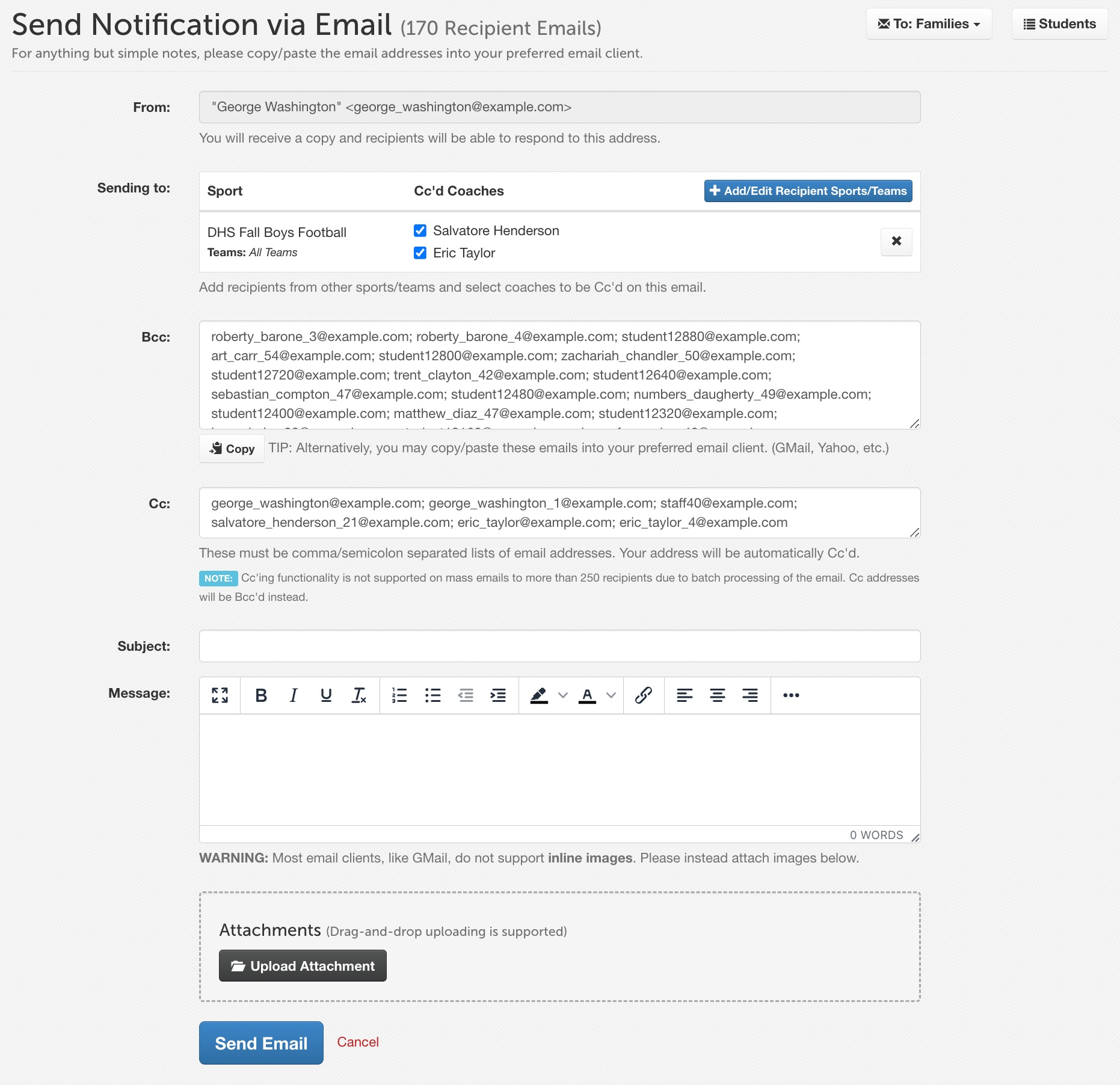
NOTE: You can copy and paste email addresses from the Bcc field into your preferred email client, like Outlook or Gmail, with the Copy button.
With these communication options, you can build a more connected, informed community that benefits athletes, parents, families, and coaches.