How Do I Create an Activity?
Welcome to our guide on creating a new activity in FinalForms! This simple process will help you set up activities efficiently, ensuring that all necessary details are captured. Let's walk through the steps together!
Follow these easy steps to create a new activity:
Click on Manage in the main menu, then select Activities.
Click the New Activity button.
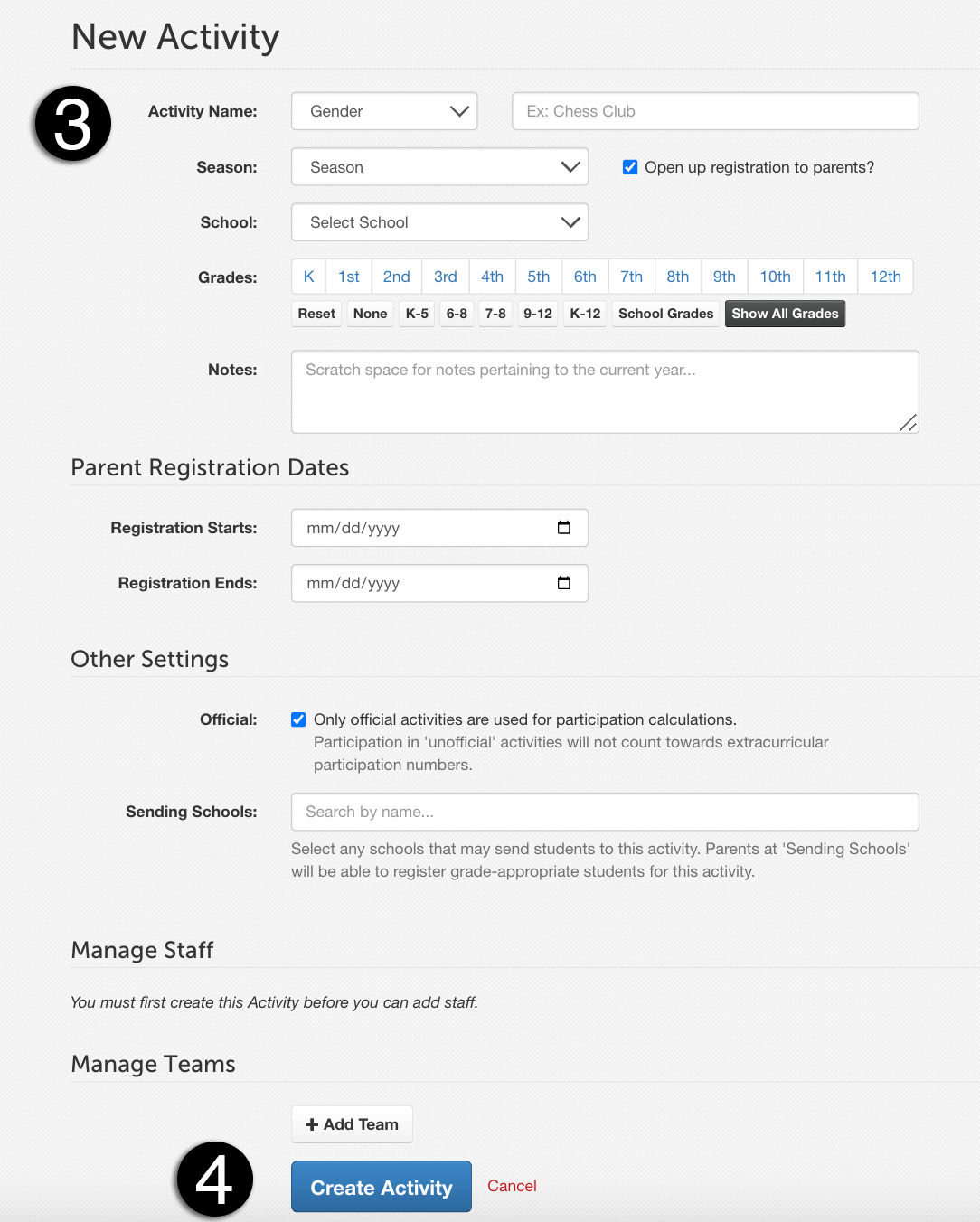
Select the following information:
Gender
Activity Name
Season
Grades
Notes
Parent Registration Dates (Note: Unselected Start/End dates will default to School settings.)
Finally, click the Create Activity button at the bottom of the page.
Adding Advisors and Forms
Once your activity has been created, you can easily add advisors and forms to it. This allows you to manage your activity more effectively and keep everything organized.
And that's it! You're now ready to create activities in FinalForms with ease. If you have any questions or need further assistance, feel free to contact our Support Team!