
My Student Isn't Receiving Emails.
If your student isn't receiving emails from FinalForms, like confirmation emails, signature reminders, or messages from coaches or advisors, here are a few quick things to check.
Check the Spam or Junk Folder
Email providers may filter FinalForms messages into the Spam or Junk folder. Have your student check these folders. If a FinalForms email is found, open it and mark it as Not Spam.
Tip: Add mailman@finalforms.com to your student's contacts to avoid this issue in the future.
Make Sure the Right Email Address Is on File
The email might be going to an unexpected destination.
Log in to your FinalForms account
On the My Students page, look underneath your student's name to verify which email address is currently on their account.
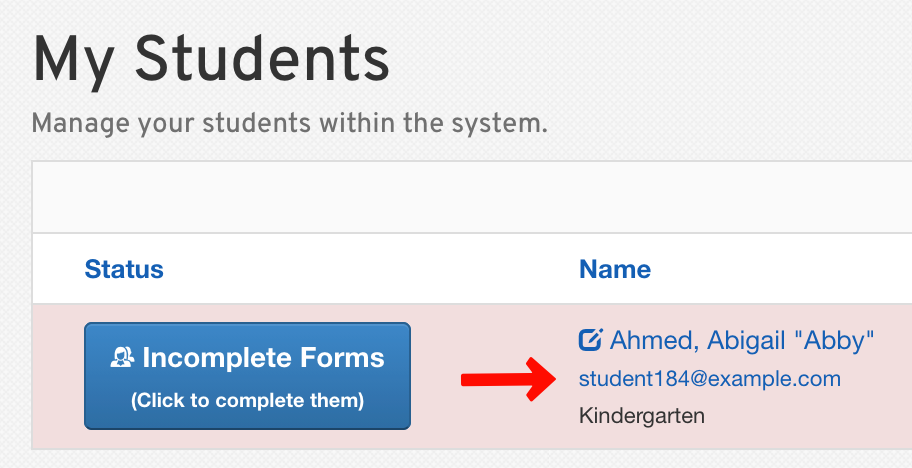
If it's wrong or outdated, click the Edit button to update it. Your student will then be sent a confirmation email at the updated address.
Try a Different Email Address
If your student uses a school-issued email address (e.g., student@schooldistrict.edu), the school's system may block external messages. To avoid registration delays, consider changing your student's email to a personal account (e.g., Gmail, Outlook, Yahoo).
Click the Edit button on your My Students page to update the email address, and your student will receive a confirmation email at the new address.
Still Not Getting Emails?
Contact the FinalForms Support Team by clicking the Get Help button at the bottom of any page. When describing your issue, specify which emails your student is not receiving (e.g., from a coach, confirmation emails, signature reminders, etc.).