View or Edit a Payment
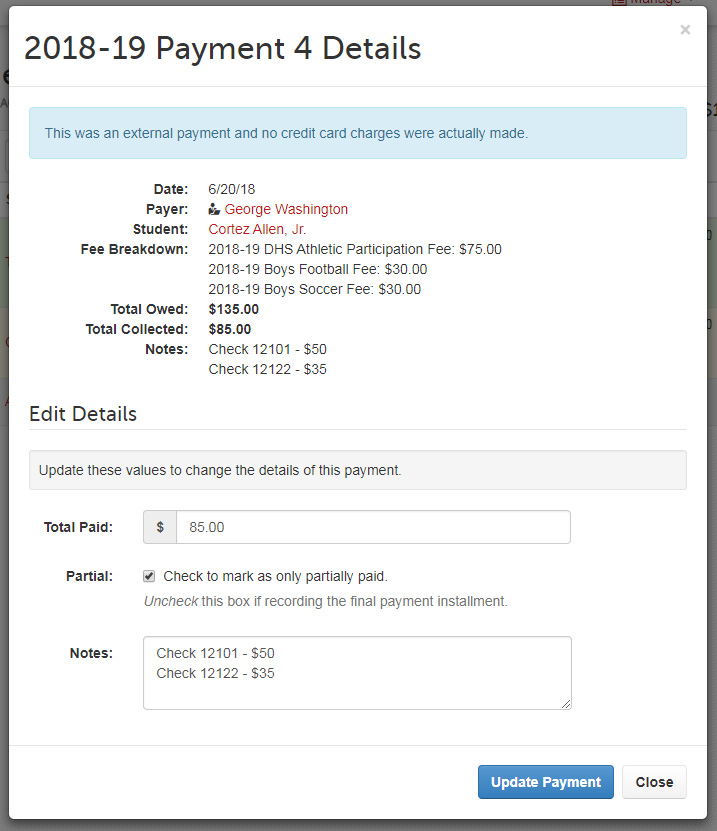
In this guide, you will learn how to open a specific payment to view its details, add notes, and, for external payments, modify the amount or mark it as partial.
Go to Manage > Payment History.
Click the Details icon on the payment you want to view or edit.
Add notes as needed to provide additional context or information.
Click Update Payment at the bottom of the pop-up to apply your changes.
Tips for Effective Payment Management
Use the Partial checkbox to track payment plans. This is especially useful when you are expecting additional funds. Once those funds are received, update the payment and set the amount accordingly.
We hope this guide helps you manage your payments more effectively in FinalForms. If you have any questions or need further assistance, feel free to reach out to our Support Team!