
How Do I Unenroll or Withdraw My Student?
We understand that navigating school processes can sometimes be a bit challenging, and we're here to help clarify things for you.
Withdrawing Your Student
If you need to update your child's status to withdrawn from school, please note that a school administrator must complete this action. Unfortunately, we are unable to make this change on your behalf.
Next Steps
To ensure a smooth transition, we recommend the following steps:
Contact the school administration directly to request the withdrawal.
Provide any necessary documentation or information they may require.
Follow up to confirm that the status has been updated.
Opting Out of Future Notifications
In the meantime, you can opt out of emails (and texts if your school has CampusCommand texting enabled) on the My Students page in your account. Here's how:
Click the Edit button in your student's row.
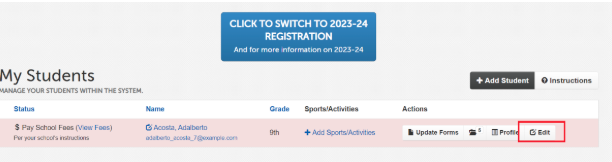
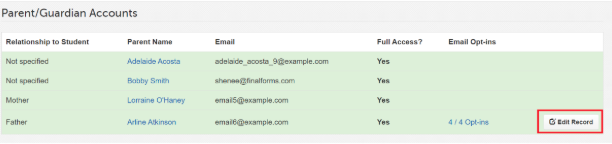
Scroll down to the Parent/Guardian section of the page and click Edit Record next to your name.
Check or uncheck any boxes to update your notification settings.
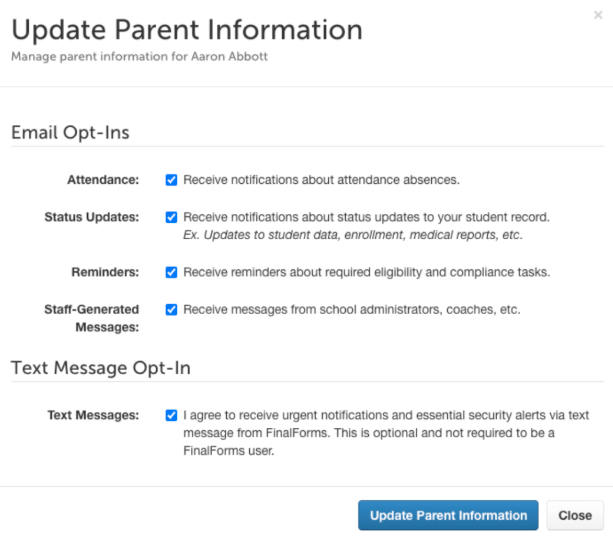
Click Update Parent Information to save these changes.
Repeat this process for any additional students if necessary.