
Setting Official Vs Unofficial Sports
Welcome to our guide on creating unofficial sports within the FinalForms platform! This document is designed to help administrators navigate the process of adding sports that don't require formal recognition from state or national associations. Understanding this feature can help you enhance your sports offerings and provide more opportunities for student participation.
Creating an Unofficial Sport
As an administrator, you have the ability to designate a sport as unofficial when creating it in FinalForms. This feature is especially beneficial for schools or organizations looking to offer additional sports without the formal requirements associated with official sports.
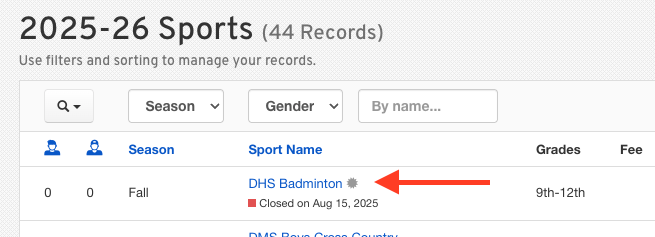
All unofficial sports can be identified on the sports table by the grey asterisk next to the sport's name.
Steps to Create an Unofficial Sport
Log in to your FinalForms administrator account.
Navigate to the Sports Management section of the platform.
Select the option to create a New Sport.
Fill in the required details for the sport, including the name and description.
If the sport name includes any of the following terms, it will automatically be recognized as an unofficial sport:
Manager
Statistician
Medicine
Wheelchair
Tryout
Club
Clinic
Intramural
Check the box to designate the sport as unofficial.
Save your changes to finalize the creation of the unofficial sport.

Benefits of Unofficial Sports
Designating a sport as unofficial can provide several advantages, including:
Flexibility in offering a wider range of activities for students
Summer sports
Reduced administrative burden associated with official sports regulations
Encouragement of student participation in diverse athletic interests
For more information on managing sports in FinalForms, please visit our support page.