
Deleting or Locking a Parent Account
Welcome to our guide on managing parent accounts! As a registrar, you can delete or lock parent accounts as needed. This document will walk you through the steps for both options and explain the implications of each action.
Parent accounts can be deleted or locked depending on whether access should be permanently removed or temporarily restricted.
Deleting a Parent
To delete a parent account, follow these simple steps:
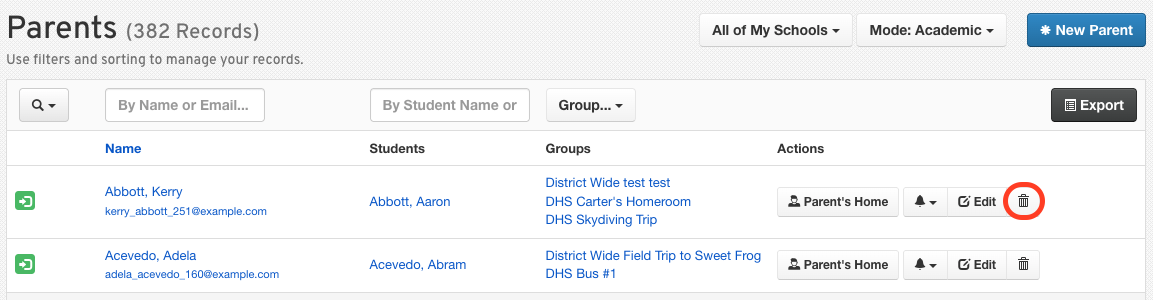
Go to Manage > Parents.
Click Delete (trash icon) on the parent row you wish to delete permanently.
Important:
When you delete a parent account:
It removes their login access.
This is the best option if there are duplicate parent accounts.
It does not remove their contact information from student forms.
You may need to update the student’s forms next to reflect this change.
Locking a Parent (Recommended)
Locking a parent account is often the best option, especially when custody or access changes occur. Here’s what locking does:
Preserves account history.
Prevents login access.
Stops all email communications.
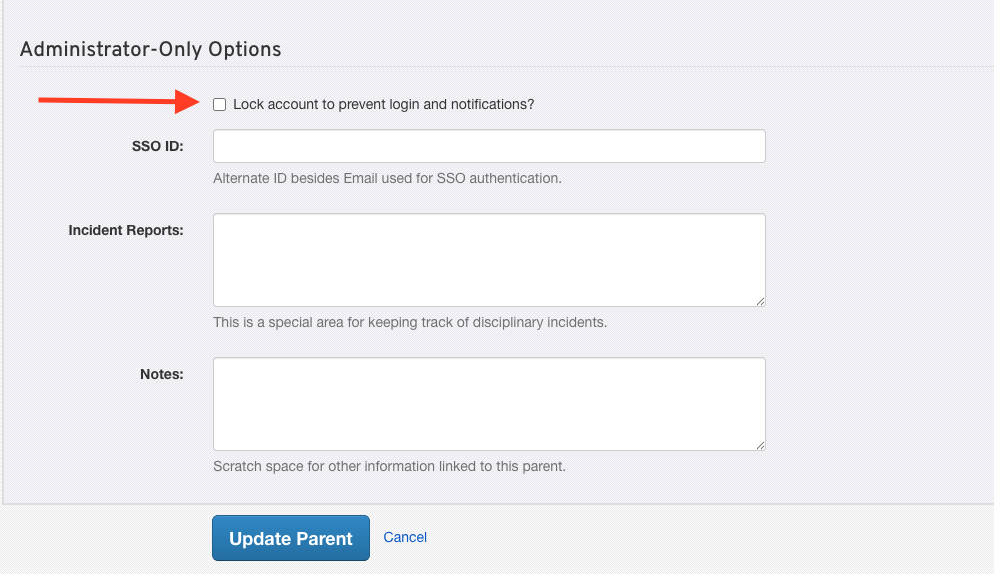
By locking the account, you prevent the parent from accessing it while preserving their information for future reference.
We hope this guide helps you manage parent accounts effectively! If you have any questions or need further assistance, feel free to contact the FinalForms Support Team.