
Filtering Parent Accounts
Welcome to our guide on using filters in FinalForms! This feature helps you quickly locate parents based on various criteria, making your administrative tasks easier and more efficient. Let's dive into the details!
Filters are a powerful tool that lets you quickly find parents based on specific criteria, such as school, student status, participation, or confirmation status. This functionality streamlines your workflow and enhances communication with parents.
Available Filters
Here are the filters you can use to narrow down your search:
School / School Level: Filter by the specific school or educational level.
Student Status: Choose between Active or Attending students.
Account Confirmation Status: Identify whether parent accounts are confirmed or unconfirmed.
Sport / Activity / Group: Find parents associated with specific sports, activities, or groups.
Parent Name or Email: Search for parents using their names or email addresses.
Student Name or ID: Locate parents by entering the student's name or identification number.
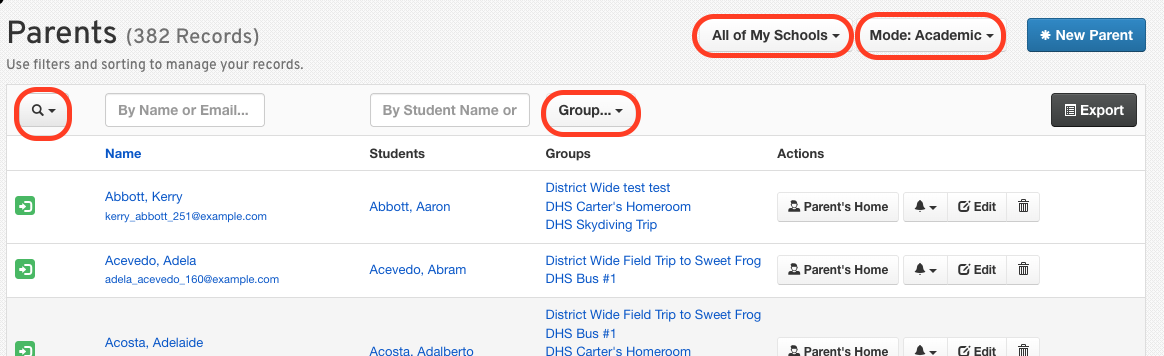
Remember, you can combine these filters to refine your search further!
Common Use Cases
Here are some common scenarios where filters can be particularly useful:
Find parents of current athletes: Quickly access contact information for parents of current athletes.
Identify unconfirmed parent accounts: Easily spot parents who have not yet confirmed their accounts.
Export parent contact lists: Generate lists of parent contacts for communication or outreach purposes.
By using these filters, you can improve efficiency and ensure you have the right information at your fingertips. Happy filtering!