
Parent Confirmation Icon and Notifications
Welcome to our guide on parent status icons! In this article, we will explore the different roles involved, the meanings of the icons, and how to resend confirmation to parents. Let's get started!
Parent status icons indicate whether a parent has confirmed their account. Understanding these icons can streamline communication and ensure that all parents are engaged with our platform.
Icon Meanings
Here's what each icon represents:
Red: Account is not confirmed
Green: Account is confirmed and active

Resending Confirmation
If a parent needs to confirm their account, you can easily resend the confirmation link. Here's how:
Click on the Notify button.
Select Resend Confirmation.
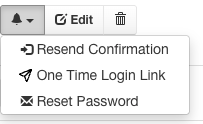
Additionally, parents can also request confirmation from the login page if they need assistance.
We hope this guide helps you better understand parent status icons! If you have any questions, feel free to reach out to the FinalForms Support Team.