
New Enrollment Forms Missing
This document provides guidance on how to manage new student registration forms in FinalForms, specifically addressing the importance of the Applicant record in the enrollment process. If you are unable to view the New Student Registration forms, it is likely due to the Applicant status missing for the student's record. This article outlines the steps to create an Applicant enrollment status to ensure a smooth enrollment process.
Steps to Add an Applicant Enrollment Record
To add an Applicant enrollment record for a student, please follow these steps:
Navigate to Manage > Students.
Click the Edit button in the row corresponding to the student.
Scroll down to the Admin Only section of the page.
Click Add Enrollment Record.
Enter the enrollment information with an Applicant Status and click Add Enrollment Record to complete the process.
It is important to note that the Start and End Dates for the Applicant record should reflect the timeline of the student's application. Specifically, the Start Date should be the first date the student applied, while the End Date should be the last day before their start date as an Active student.
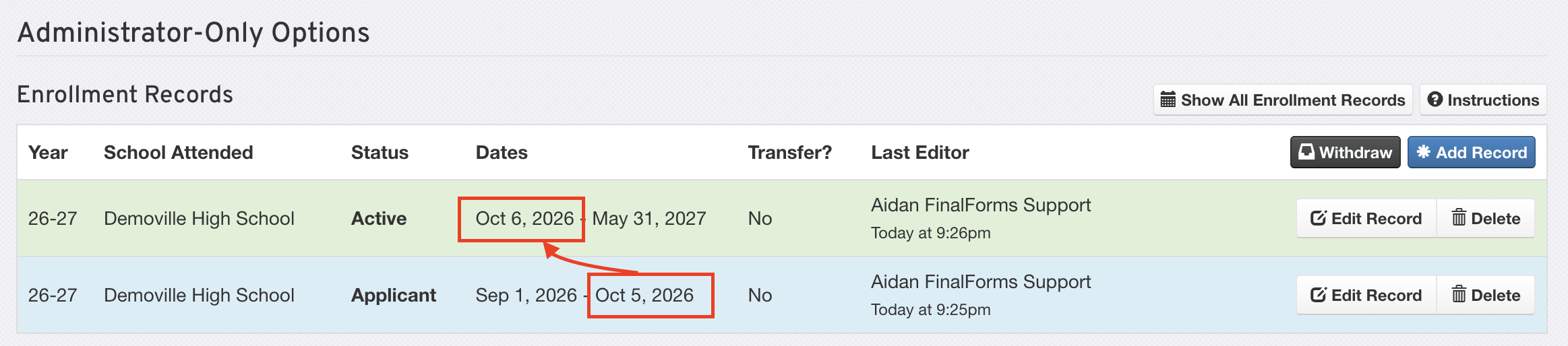
Once this is completed, the New Student Registration forms will appear on the student's account. If you have any questions or require further assistance, please do not hesitate to contact our Support Team.