
How to Update a Parent's Email Address
Welcome to our guide on managing parent accounts in FinalForms! In this article, we will walk you through the steps to update a parent's email address, keeping your records accurate and up-to-date.
Steps to Update Parent Email Address
To update a parent's email address, you will need to make changes on both the Parent Edit page and the Contact Information form. This ensures that the updated email address reflects on the student's profile page, as the information is pulled directly from the Contact Information form. Follow the instructions below:
On the Parent Edit Page:
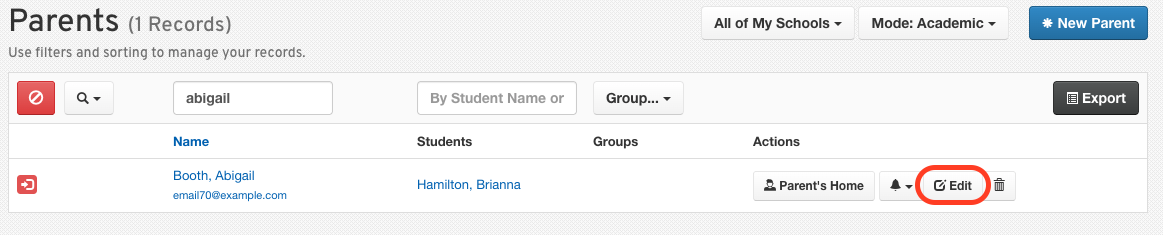
Click on Manage > Parents.
Click the Edit button in the row of the parent you wish to update.
Edit the Email Address field.
Click Update Parent at the bottom of the profile.
Note: The old email address will remain visible on the parent's account until they click on the account confirmation link that is automatically sent to their updated email address. Parents can continue to log in using their old email address until they confirm the new one.
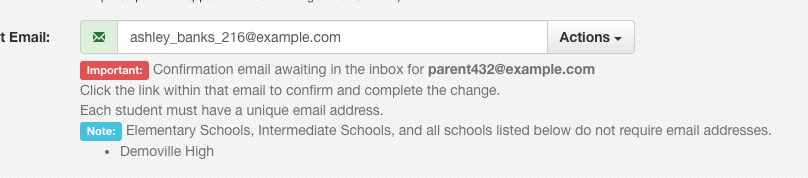
How to Force Email Address Confirmation:
If necessary, administrators can completely remove the old email address from the parent's account. We recommend doing this if the parent's old email address has been compromised.
To Remove the Old Email Address:
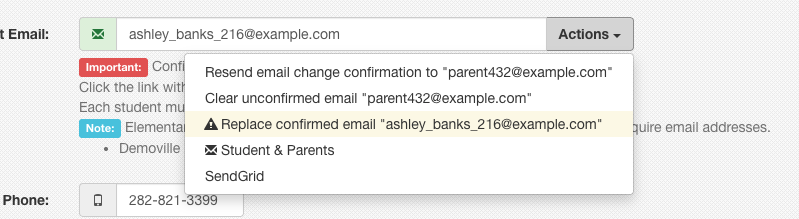
Return to the parent's edit page and click on the Actions button in the email address field.
Select the Replace the confirmed email option from the dropdown menu. This will ensure that the parent can log in only with their new email address after completing the account confirmation steps.
On the Contact Information Form:
Go to Manage > Students.
Search for the student whose parent's email you wish to update.
Click the Edit button on the student's record.
Ensure you are viewing the Contact Information form.
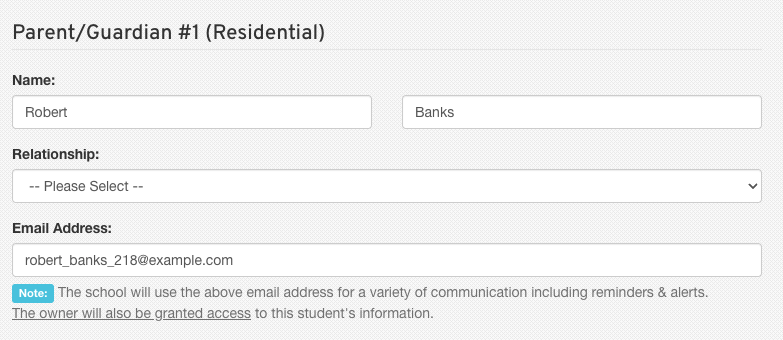
Edit the appropriate parent's email address.
At the bottom of the form, check the box for Parent Approved Changes and input a reason.
Click Submit Form to save the changes.
We hope this information helps you manage parent accounts effectively! If you have any questions or need further assistance, please don't hesitate to reach out to us.
Thanks for using FinalForms!