
Parent Forgot Password (Send Password Reset)
In this article, we will guide you through the process of sending a password reset email to parents or directing them to self-service options. This ensures that parents can easily regain access to their FinalForms accounts.
How to Send a Password Reset Email
If you need to assist a parent in resetting their password, follow these simple steps:
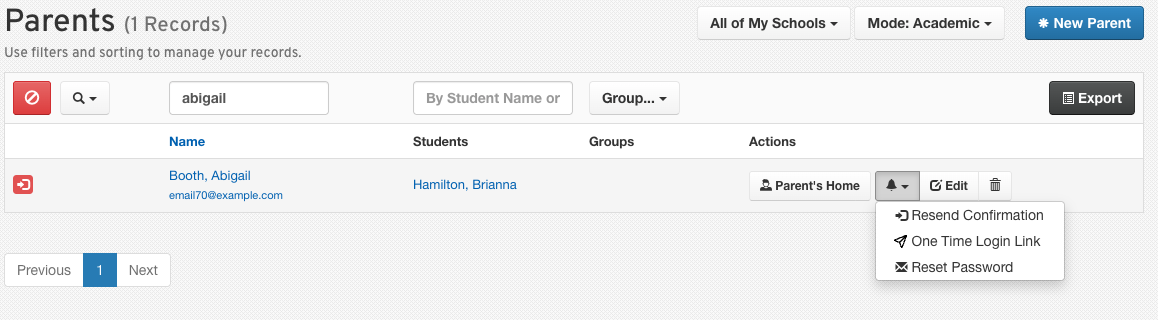
Navigate to the Manage section and select Parents.
Use the search function to find the parent by their name or email address.
Open the parent record and click on the Notification Bell to send a password reset email.
Self-Service Password Reset
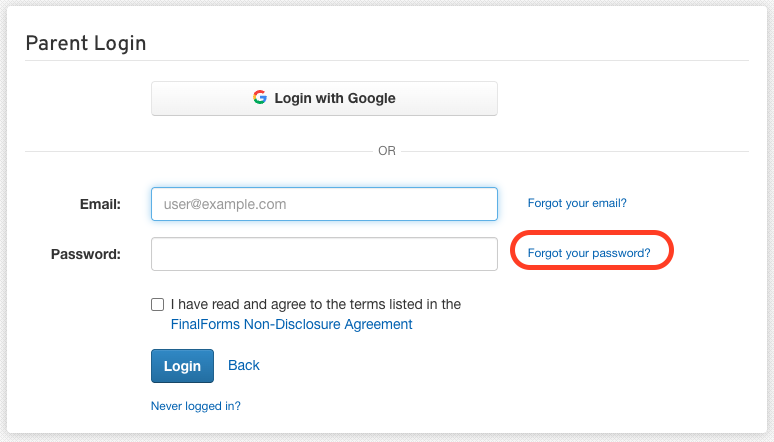
Parents can also reset their passwords independently. To guide them through this process, direct them to your FinalForms site and instruct them to click on the Forgot your password? link. This will allow them to initiate the password reset process themselves.
By following these steps, you can ensure that parents have a smooth experience when accessing their accounts. If you have any further questions, feel free to reach out to the FinalForms Support Team for assistance!