
Read-Only Access for Parent (Notifications Only, No Signing)
In this guide, we will walk you through the steps to enable a parent to receive notifications while ensuring they do not have the ability to sign forms. This feature is particularly useful for keeping parents informed without granting them full access to form signing capabilities.
Steps to Allow Parent Notifications
Follow these simple steps to manage parent notifications:
Navigate to Manage > Parents.
Use the search function to search for the parent's name.
Once you have located the parent, click the Edit button for their account.
Scroll down to the Student Accounts section, click on the Edit Record button.

Check the box for Read Only from the options available.
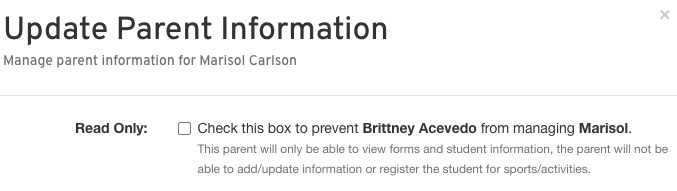
Finally, click on Update Parent to save your changes.
By following these steps, you can ensure that parents receive important notifications while maintaining control over form signing permissions. If you have any questions or need further assistance, feel free to reach out to the Support Team at FinalForms!